POS / Till
Restaurant POS that makes the cashier's day easier
Moment of the day: Service
Digigarson POS is restaurant till software that runs on a Windows PC. It brings everything the cashier does, from the floor plan to payment and from kitchen tickets to the Z report, onto one screen, and it updates itself.
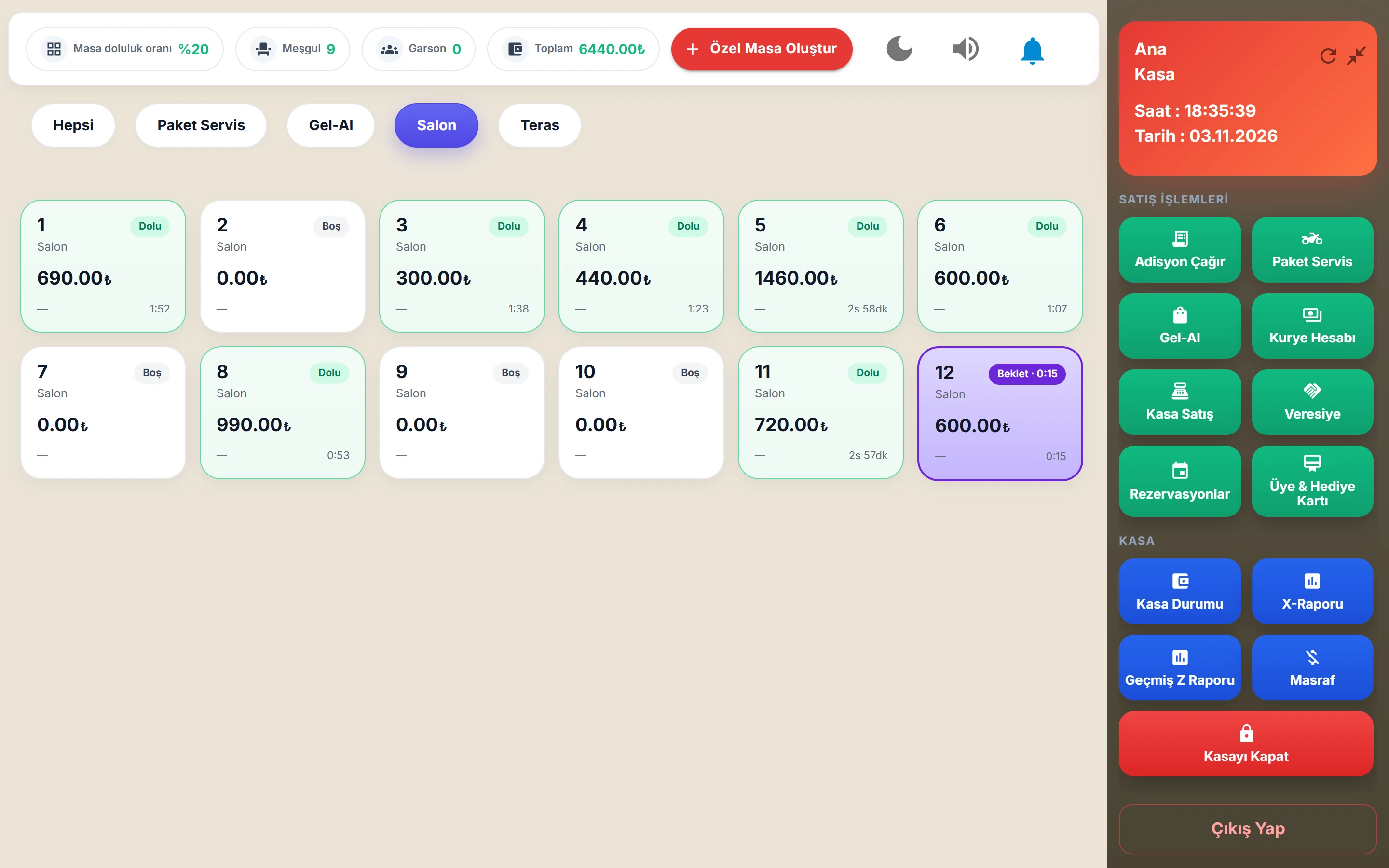
Table plan and checks
Divide your floor into sections (garden, terrace, indoor) and place the tables. Occupied and free tables are visible at a glance.
- Sections and ad-hoc tables
- Product options and item notes
- Moving and merging tables
- Hold / Fire: hold an order and send it to the kitchen when you choose; a held table shows in its own colour with the waiting time
- Overdue table alert: a table with no new order for a long time is flagged
- Recall Check: correcting a closed check with a permission code
The kitchen gets the right ticket from the right printer
When you send an order, the ticket is split by product group: drinks print at the bar, hot dishes in the kitchen, desserts at the pastry station. Customer receipts print on 78 mm thermal paper.
Payment: fast, flexible, recorded
The cashier can take the bill in one go or split it.
- Cash, credit card, house account (tab), meal cards, non-payable/comp
- Bill splitting by check or by item
- Discounts, service charge and voids with a reason
- Tips: cash or card, to a staff member or a shared pool; kept apart from revenue
- A reservation deposit is deducted from the check automatically
- Payment with a member or gift card (optional module)
- Currencies: branch-specific exchange rate table
Opening and closing the till, Z report
The till is opened at the start of the day and closed at the end. The Z report shows who collected how much, per person; Z reports of past days can be printed again by choosing the date. Quick sales (counter sales) are made without opening a table.
Barcode, scale, delivery
Packaged items are sold with a barcode scanner, weighed items with a scale. Delivery, takeaway and courier assignment are managed from the same till.
Set the screen up for your business
Buttons on the till's home screen can be shown or hidden per branch, so cashiers only see what they use. Light and dark themes are available. The till app installs digitally signed updates on its own; cashiers never have to install anything.
Frequently asked questions
Which operating system does Digigarson POS run on?
The till app runs on Windows 10 and Windows 11 computers.
Can kitchen tickets be split across different printers?
Yes. Kitchen tickets are split by product group, and each group prints on its own printer.
How do split bills work?
The whole check or selected items can be paid separately, and each payment is recorded with its own method.
Can a closed check be corrected?
Yes, with the Recall Check feature. It requires a permission code and is logged.
Does the Z report show who collected how much?
Yes. Collections are broken down per person on the Z report, and Z reports of past days can be printed by choosing the date.
See how it works in your own venue
Let's talk about your tables, menu and printer layout and work out the right setup together. Our WhatsApp line is open 24/7.